Your Quest Map
The seven steps from idea to live app, what each one is for, and who leads it.
What it is
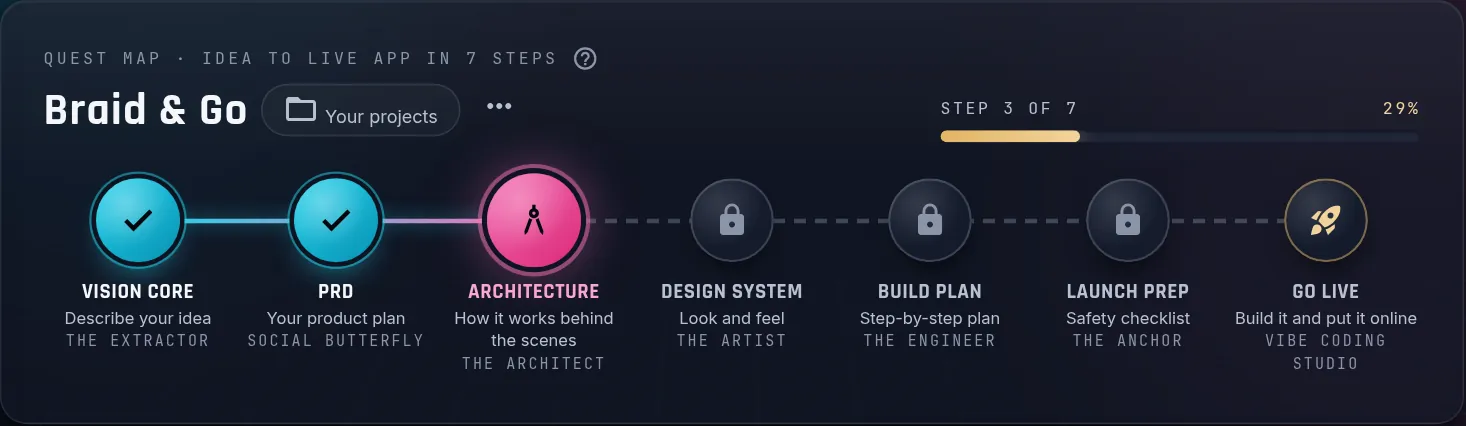
The Quest Map on Mission Control shows your project's journey in seven steps. Each step has a plain subtitle under its name. Finished steps light up, the next one is highlighted, and the bar says where you are, like Step 3 of 7.
Why it matters
Building something can feel huge. The map breaks it into small, finishable pieces, so you always know where you are and what's next.
The seven steps
| Step | Led by | What happens | Why it exists |
|---|---|---|---|
| 1. Vision Core · Describe your idea | The Extractor | Four short answers: problem, solution, audience and vibe. | A fuzzy idea makes everything after it fuzzy. |
| 2. PRD · Your product plan | Social Butterfly | Who it's for, what it must do, and what comes first. | Keeping version one small means you launch sooner. |
| 3. Architecture · How it works behind the scenes | The Architect | What your app saves, and who is allowed to see it. | Much cheaper to fix on paper than after it's built. |
| 4. Design System · Look and feel | The Artist | Colors, fonts and buttons. | One consistent look feels trustworthy. |
| 5. Build Plan · Step-by-step plan | The Engineer | The build broken into small steps, in the right order. | So the studio builds the right thing first. Nothing is built yet at this step. |
| 6. Launch Prep · Safety checklist | The Anchor | Sign-in, security rules, a spending alert. | A public app needs locks on the doors before it opens. |
| 7. Go Live · Build it and put it online | Vibe Coding Studio | Build the real app, try it, lock it down and publish it. | This is where your app is actually built, in your own Google account. |
Steps
- Tap the Current quest card on Mission Control.
- Chat with the crew member who leads that step.
- When they save the result to your dossier, the step lights up and the next one opens.
Tips
- You can talk to any crew member at any time. The map is a guide, not a cage.
- Each step's result is saved in your dossier (saved plans) in Team Chat.
- Working on more than one idea? Each project has its own map. Switch from Your projects.
What's next
See how it all fits together, or start with the Vision Core.
Related guides
- Getting StartedHow it all fits togetherThe whole journey in one page, from the idea in your head to a live app, and why each step exists.
- Your Quest MapStep 1: Your Vision CoreThe Extractor captures the heart of your idea in four parts.
- Your Quest MapStep 2: Your PRD (product plan)Social Butterfly writes your product plan, so everyone builds the same thing.