Your Founder File
Help the crew get to know you. Paste or upload a bio or brand doc; every crew member uses a short summary.
What it is
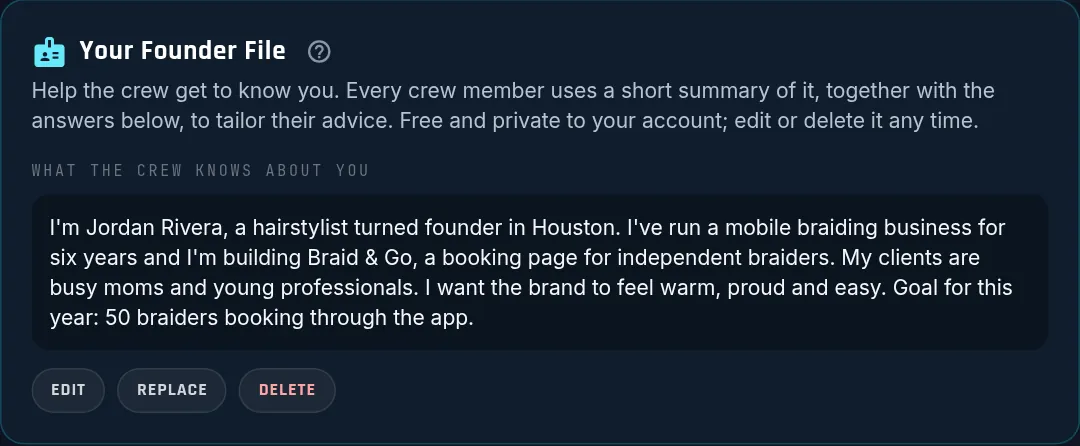
Your Founder File · Help the crew get to know you. It's one place to tell the crew who you are: your background, your business, who you serve, how you like to sound, and your goals. Social Butterfly makes a short summary, and every crew member uses it to tailor their advice.
Where to find it
- At the top of Profile (Profile & Settings in the menu).
- As the optional last step of the welcome for new members.
- On your Getting Started checklist: Tell the crew about you.
- On Mission Control, a small card reminds you until you've added one.
Steps
- Paste anything about you (a short bio, your LinkedIn About, what you sell and to whom), or tap Or upload a file and pick a PDF, Word (.docx), .txt or .md file.
- Tap Save my Founder File.
- Check the summary. Tap Edit to fix anything, Replace to start over, or Delete to remove it.
What it powers
Crew chats, Talk to the Crew (voice), the Clarity Hub's Strategy Analysis, the go-to-market planner and your Studio plan all read the summary, along with the four answers in Profile.
Good to know
- Included. It doesn't use credits.
- Private. It's saved on your own account. The crew treats it as background facts.
- Keep it short and true. A few honest paragraphs beat a long résumé.
- PDFs up to 4 MB. For a longer document, paste the most important part.
What's next
Tell the crew your first idea.
Related guides
- Getting StartedProfile and SettingsYour Founder File, four answers about your business, and your plan, newsletter and account.
- Meet Your CrewMeet your crewThe eight AI specialists on your team, what each one does, and when to call them.
- Studios & HubsThe Clarity HubTalk through any business decision, like pricing or which offer to launch first. Mindset support is there too.