Your projects
Pick up where you left off, switch between projects, start a new one, or delete one.
What it is
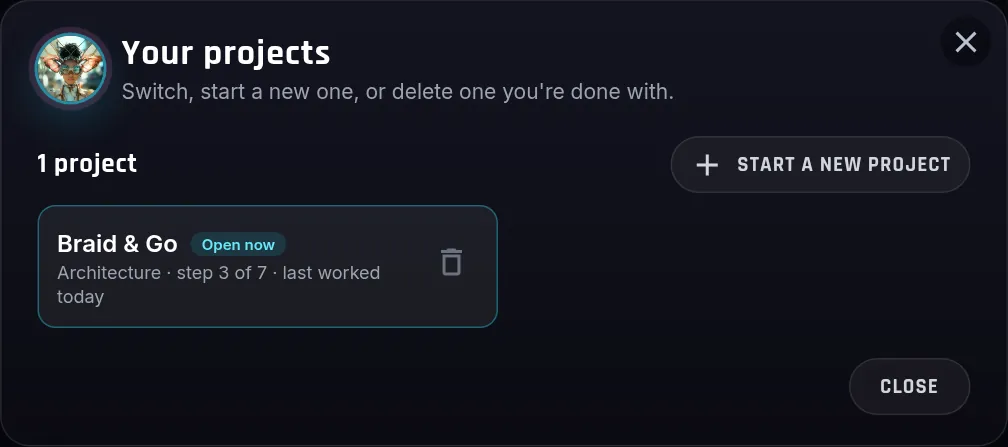
A project is one idea you're working on (you may also see it called a venture). Each project has its own quest map, Team Chat history and dossier of saved plans. You can have as many as you like, and you're never locked into one.
Where to find it
- Your projects in the left menu.
- The Your projects button next to the project name on the quest map.
- The project menu at the top of Team Chat.
- When you sign in, the Welcome back card: "Last time you were working on…" with a Continue button and all your projects.
Steps
- Continue: tap Continue on the Welcome back card to pick up with the right crew member.
- Switch: tap any project in the list. Mission Control and Team Chat switch to it.
- Start a new project: tap Start a new project, then tell the crew your idea in a sentence or two.
- Delete: tap the trash icon next to a project, then confirm. Deleted projects are kept for 30 days in case you change your mind (contact Support to bring one back).
Tips
- Don't want the Welcome back card every time? Tick Don't show this at login on the card. Your projects stay one tap away in the menu.
- Each list item shows the step you're on and when you last worked on it.
What's next
Related guides
- Getting StartedMission Control: your home baseA tour of your home screen, from the quest map to the crew cards.
- Meet Your CrewTeam ChatChat with your crew, see your saved dossier, and understand your chat allowance.
- Getting StartedShare your first ideaGet your first real answer from the crew in under a minute.